


Overview of the BC.Game Withdraw System and Payout Infrastructure
The BC.Game withdrawal service supports bank and cryptocurrency payouts, subject to balance eligibility and security verification. In Mexico, SPEI and Transferencia Bancaria provide MXN bank-transfer options with an estimated processing time of around two minutes. Arcus is another local payment option, while cryptocurrency transfers depend on the selected blockchain and confirmation requirements.
Withdrawal conditions vary by payment method and currency. The main differences concern minimum amounts, processing stages and the receiving destination.
| Payment Method | Currency | Minimum Withdrawal | Processing Time | Main Advantage |
| SPEI bank transfer | MXN | MX$26.00. | Around 2 minutes estimated; actual delivery may vary. | Transfer to a compatible Mexican bank account. |
| Transferencia Bancaria | MXN | Depends on the applicable account conditions. | Around 2 minutes estimated; actual delivery may vary. | Alternative local bank-transfer option. |
| USDT withdrawal | USDT | 22.95 USDT. | Approval and network confirmation time vary. | Transfer to a compatible stablecoin wallet. |
| Bitcoin withdrawal | BTC | 0.0009 BTC. | Approval plus variable blockchain confirmation. | Direct BTC payout to an external wallet. |
| Ethereum withdrawal | ETH | 0.0205 ETH. | Approval plus network confirmation. | Direct ETH payout to an external wallet. |
BTC, ETH and USDT have no preset maximum withdrawal under the standard currency limits. This does not remove identity checks, transaction reviews or other account-specific restrictions.
Understanding BC.Game Minimum Withdrawal and Limit Policies
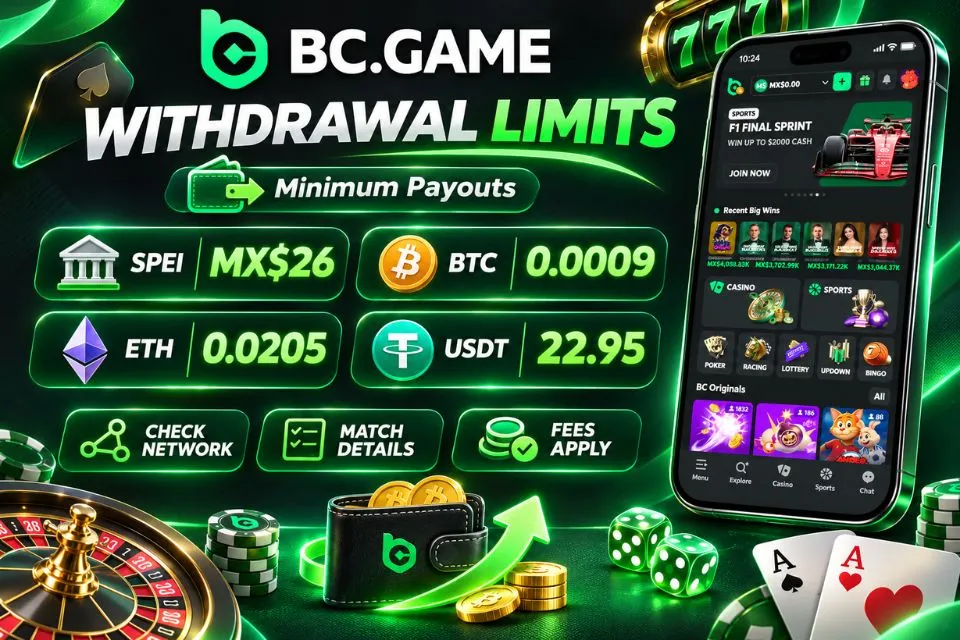
The BC Game minimum withdrawal is MX$26.00 for SPEI transfers in Mexican pesos. Cryptocurrency thresholds are set in the respective assets: 0.0009 BTC, 0.0205 ETH and 22.95 USDT. Currency conversion does not make these amounts interchangeable.
The main conditions to consider before requesting a payout are:
- The minimum SPEI cash-out amount is MX$26.00 for eligible MXN transfers.
- The crypto withdrawal minimums are 0.0009 BTC, 0.0205 ETH and 22.95 USDT.
- BTC, ETH and USDT have no preset maximum withdrawal, but account and transaction controls still apply.
- The receiving account, blockchain network, available balance and applicable fees must match the proposed payment.
- The withdrawal threshold should not be confused with the separate minimum deposit or game stake.
A BC Game withdrawal limit may also reflect verification or provider rules. The separate deposit minimums are 0.0001 BTC, 0.0003 ETH and 1 USDT, which must not be mistaken for payout thresholds.
Expected BC.Game Withdrawal Time Across Supported Networks
BC Game withdrawal time includes the approval stage and the transfer through the selected payment provider or blockchain. SPEI and Transferencia Bancaria have an estimated processing time of around two minutes for MXN payouts. Bank receipt may take longer if additional security checks or provider delays arise.
Withdrawal times differ for cryptocurrency. BTC and ETH transactions rely on confirmation by the network, whereas transfers of USDT are determined by the selected blockchain network and its load at that particular moment.
If your withdrawal has pending, processing, or completed status – check the transaction history for that. Make sure not to exceed the estimated time frame.
How to Withdraw from BC.Game: Step-by-Step Instructions
The BC Game withdraw function is available through Wallet and the Withdraw section. For an MXN payout by SPEI, the player selects the receiving bank, provides the account number or other identifier requested by that bank, enters the account holder’s name and chooses a payment amount of at least MX$26.00. Transferencia Bancaria is another bank-transfer option, with its own applicable conditions.
Only available funds can be withdrawn; cash deposit methods are not automatically payout options.

Create your profile now and audit the BC Game system.
Last used 3 minutes ago
Complete Walkthrough on How to Withdraw Money from BC.Game
To understand how to withdraw in BC Game, first make sure the destination belongs to the verified account holder and supports the requested transfer. A Mexican bank account, including one with BBVA México where eligible, may require a specific account number or CLABE. The correct identifier depends on the payment method.
The following procedure explains how to withdraw BC Game funds that are already available for payout.
- Click the button below to access the official platform and sign in to the account holding the balance.
- Open Wallet, select Withdraw and choose MXN or the cryptocurrency available for the intended payout.
- Select SPEI or Transferencia Bancaria for a qualifying bank transfer, or choose a supported cryptocurrency route.
- Choose the bank, enter the requested bank account number or CLABE where applicable, and fill in Account Holder Name; for crypto, enter the correct address and network.
- Enter at least MX$26.00 for a SPEI withdrawal, or the minimum for the selected cryptocurrency, and review the balance and any charges.
- Press Withdraw and complete any requested 2FA or other security authorization, then check the transaction record.
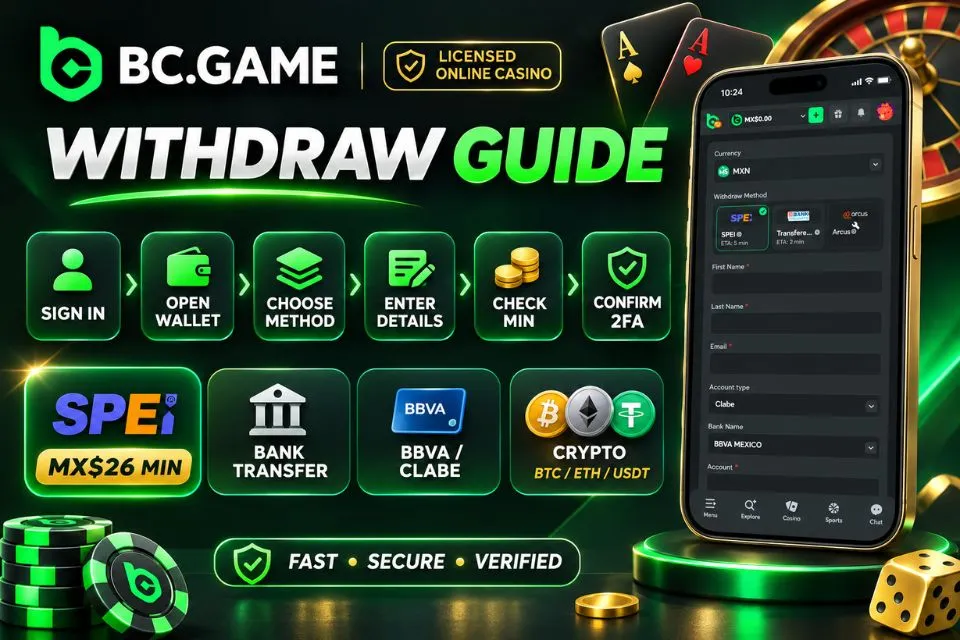
These steps explain how to withdraw money from BC Game using an eligible balance. The Min, 25%, 50% and Max shortcuts can help calculate an amount, but they do not override payout limits or verification requirements.
Keep the reference number and check transaction history before attempting the same payment again.
Account Security and 2FA Authorization During Payouts
Two-factor authentication helps ensure the security of sensitive wallet operations through an additional security factor besides the account password. Based on the configuration of the user’s account and transaction requirements, BC.Game can ask for a time-sensitive code from Google Authenticator or other supported authenticators.
Keep authenticator recovery details private. If a code fails, check the device clock and the selected authenticator profile.
New payout details or password changes can prompt security review. Use official recovery tools, not private messages offering faster withdrawals.
Troubleshooting Any BC.Game Withdrawal Problem and Verification Steps
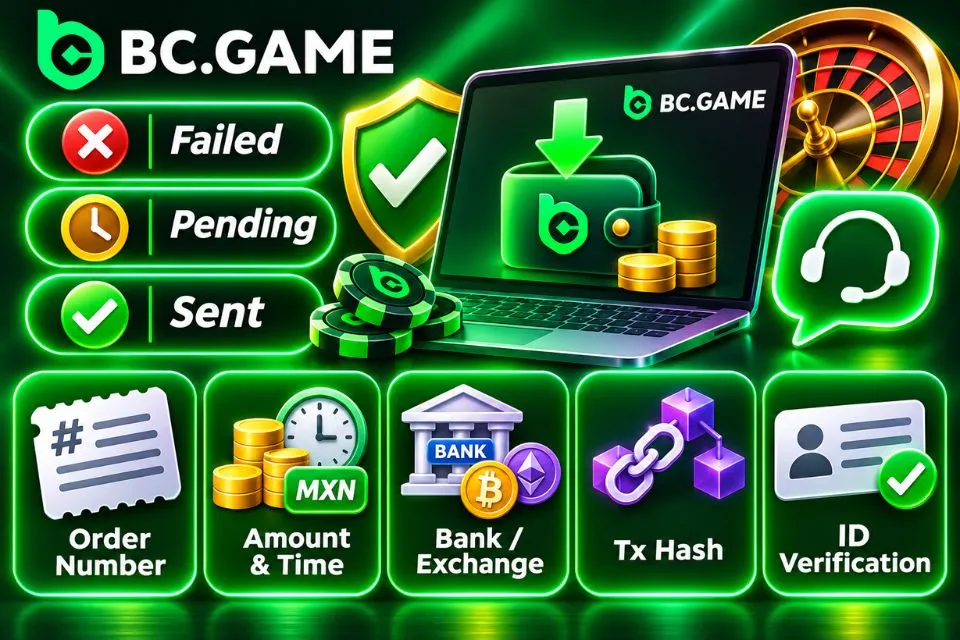
A BC Game withdrawal problem should first be classified as a failed submission, a pending internal review or a payment already sent but not received. Check the current status before selecting a remedy.
In order to provide assistance regarding any delay or rejection in the payments, please provide the following details:
- Withdrawal reference number/Order number from the transaction history.
- Requested amount, currency, and time of requesting the same.
- Name of the bank or cryptocurrency exchange where the transaction was processed, without giving any password/private key details.
- Transaction hash on the blockchain, if the transaction has been initiated via cryptocurrencies.
Submit identity documents only through the account’s secure verification controls.
Common Causes of BC.Game Withdrawal Delay or Restrictions
SPEI transfers below MX$26.00 and cryptocurrency withdrawals below their asset-specific minimums may be rejected. Incomplete KYC and incorrect destination details can also prevent payment.
Typical causes of a delayed or rejected payment include:
- An MXN request below the SPEI minimum of MX$26.00 or an insufficient withdrawable balance.
- A crypto request below 0.0009 BTC, 0.0205 ETH or 22.95 USDT for the corresponding asset.
- Incorrect bank-account details, the wrong receiving bank or a name that does not match the verified account.
- A blockchain network mismatch, invalid crypto address or missing destination memo where one is required.
- Incomplete identity checks, unsettled wagers or unresolved promotional wagering conditions.
- Payment-provider review, receiving-bank processing or blockchain congestion extending the usual timeframe.
For a BC Game withdrawal problem, review the transaction status and provide the order reference to official support. A two-minute bank-transfer estimate does not rule out additional review.
Create your profile now and audit the BC Game system.
Last used 3 minutes ago
Completing KYC Verification to Resolve Payout Blocks
The Know Your Customer (KYC) process will prove the identity of the person making the request for payment by ensuring that the account belongs to that individual. The Mexican customers are expected to provide either a valid passport or INE voter’s ID and proof of residency.
Complete the identity check using these steps:
- Open the profile’s account verification or security settings from the signed-in session.
- Confirm that the legal name, date of birth and country information match the real account holder.
- Upload the requested valid identity document, such as a passport or INE, through the secure verification form.
- Provide an accepted address document, such as a recent bank statement or utility bill, if requested.
- Submit any additional selfie or information request and monitor the verification status before attempting another withdrawal.
KYC approval does not resolve wagering restrictions or incorrect bank details.
Mobile Payouts: Managing BC.Game Withdrawals via Android and iOS
The mobile wallet uses the same account balance, transaction history and security controls as desktop access. The chosen device does not change payout limits or verification rules.
Requesting a Withdrawal Using the Android APK
An official APK provides an installed Android entry point to account features, including the wallet. Use only a verified installer; Android may ask for permission to open the package.
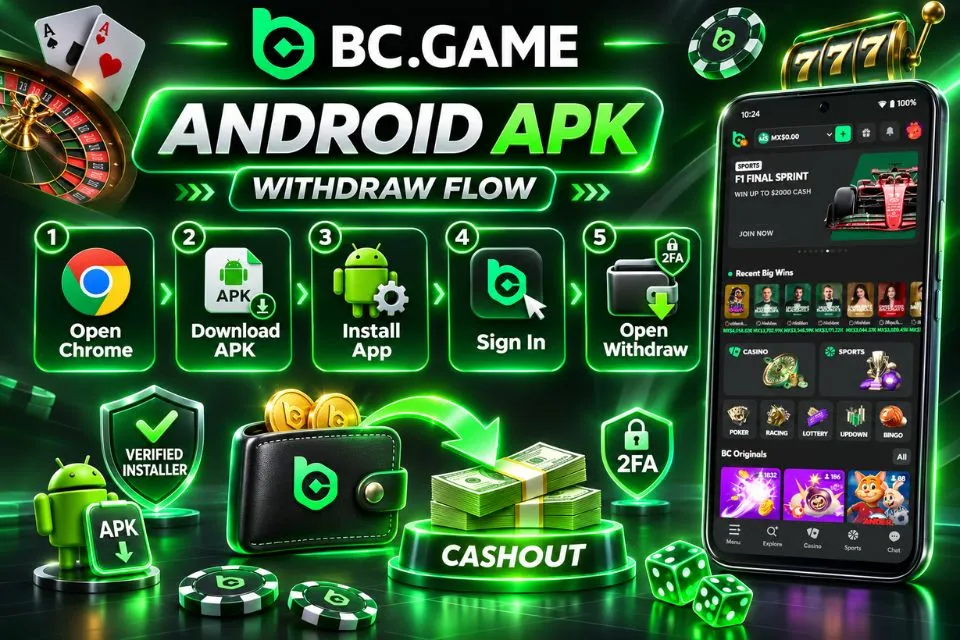
To use the installed app for payouts:
- Click the button below from Chrome on the Android phone to reach the official download route.
- Download the supported APK package and wait for the transfer to finish.
- Approve installation from that source only if the Android security prompt requires it.
- Open the saved package, complete the installation and sign in with the existing account.
- Select Wallet, open Withdraw and follow the available payout and security prompts.
Turn off installation permission afterward. Check connectivity before resubmitting an apparently stalled request.
Setting Up and Using the iOS Web App (PWA) on Apple Devices
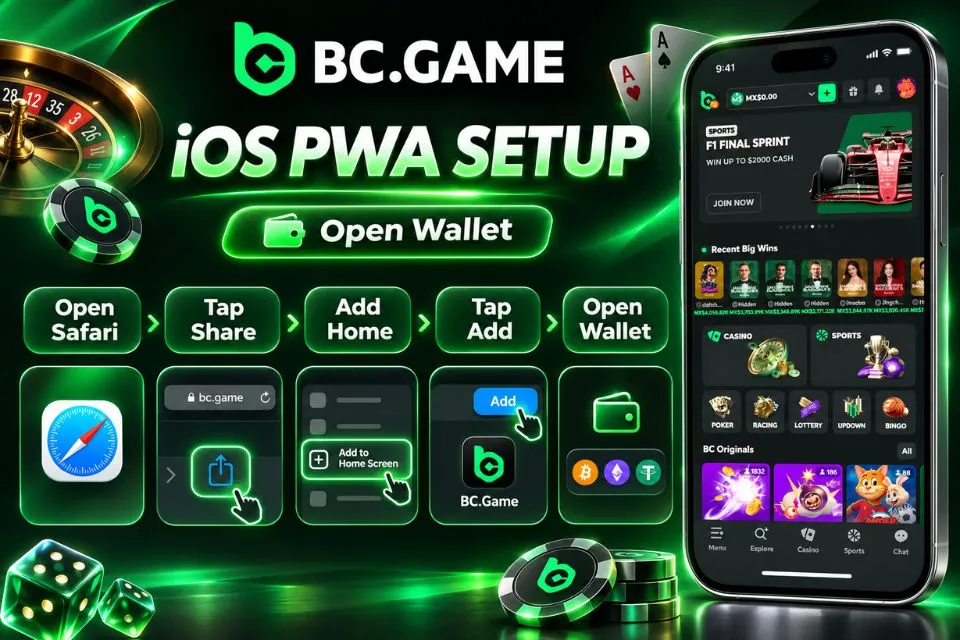
On compatible iPhones and iPads, Safari can add the platform to the home screen as a Progressive Web App (PWA). It opens the account without an Android installer.
Follow this setup sequence:
- Open the official platform in Safari on the iPhone or iPad.
- Tap the Share control in the browser toolbar or page menu.
- Select Add to Home Screen from Safari’s available actions.
- Confirm the displayed name and tap Add to create the home-screen icon.
- Launch the web app, sign in and open Wallet to review the available withdrawal methods.
A PWA needs a network connection. Device biometric autofill does not replace 2FA or cancel pending transfers.
Technical Specifications and Mexican Payout Channels
A stable connection helps prevent interrupted confirmation. Device compatibility depends on the current APK or Safari version.
The technical comparison concerns access to Wallet, not payment settlement speed.
| Parameter | Android APK | iOS PWA | Recommended Spec |
| Installation | Official Android package. | Safari Add to Home Screen. | Use a supported current version. |
| Operating system | Compatible with the offered APK. | Compatible Safari web-app support. | Updated stable operating system. |
| Memory | Depends on handset and app build. | Managed by iOS and Safari. | Around 4 GB RAM for multitasking. |
| Storage | Installer, app data and cache. | Browser and web-app data. | Maintain free space for updates. |
| Internet | Mobile data or Wi-Fi. | Mobile data or Wi-Fi. | Stable connection when confirming payouts. |
| Security | Device lock and account 2FA. | Device lock and account 2FA. | Strong password and current security patches. |
SPEI and Transferencia Bancaria allow withdrawals of MXN with a processing time of about two minutes. In the case of crypto payments, the lowest amount to be paid out is 0.0009 BTC, 0.0205 ETH and 22.95 USDT; there is no limit set for these three types of cryptocurrency. It needs to be noted that OXXO payments differ from bank withdrawals.
| Channel Name | Target Currency | Typical Limits | Security Level |
| SPEI | MXN | Minimum MX$26.00; upper limit depends on account conditions. | Receiving bank details, account review and any requested authentication. |
| Transferencia Bancaria | MXN | Subject to the applicable bank-transfer limits. | Bank destination checks and applicable account authorization. |
| USDT | USDT | Minimum 22.95 USDT; no preset maximum. | Correct token network, wallet address and account security checks. |
| Bitcoin | BTC | Minimum 0.0009 BTC; no preset maximum. | Verified destination, account review and blockchain confirmations. |
| Ethereum | ETH | Minimum 0.0205 ETH; no preset maximum. | Verified destination, account review and blockchain confirmations. |
Arcus offers an additional local payout route where eligible. Its availability and transaction terms may differ from those of SPEI or standard bank transfers.
Local Mexican Payout Options: SPEI Bank Transfers and Cryptocurrencies
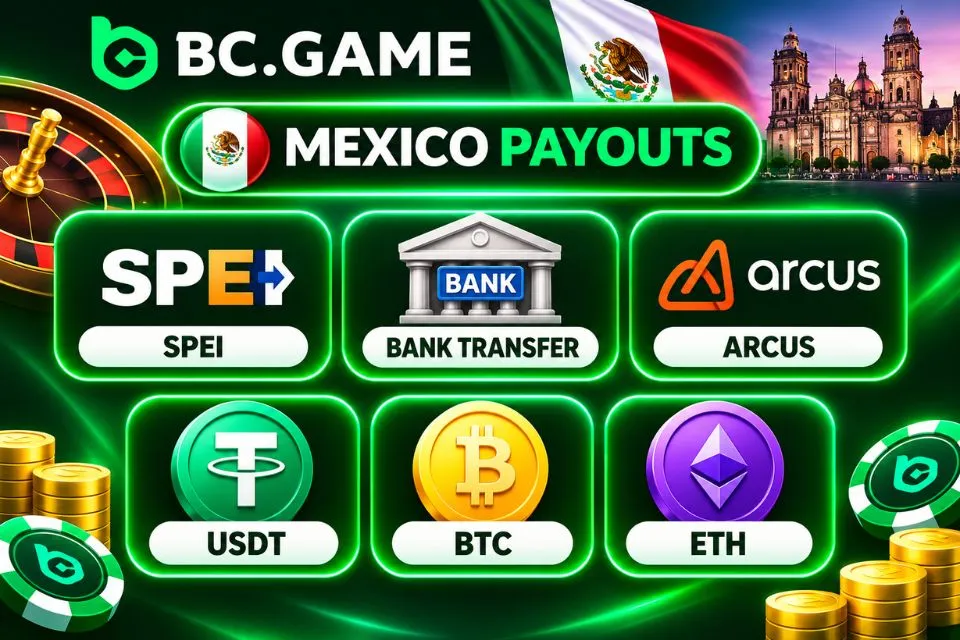
SPEI is Mexico’s interbank transfer system and provides an MXN cash-out route for eligible BC.Game accounts. Transferencia Bancaria offers an additional bank-transfer method, while Arcus may serve as another local payment option. A SPEI withdrawal requires the receiving bank, an account number or CLABE as applicable, the account holder’s name and an amount of at least MX$26.00. Eligible destinations may include BBVA México and other supported Mexican banks.
The principal payout routes have the following requirements:
- SPEI transfers MXN to eligible Mexican bank accounts from MX$26.00, with an estimated processing time of around two minutes.
- Transferencia Bancaria provides a second MXN bank-transfer route with an estimated processing time of around two minutes and method-specific limits.
- USDT withdrawals require at least 22.95 USDT and a compatible receiving network.
- BTC withdrawals require at least 0.0009 BTC and a valid Bitcoin receiving address.
- ETH withdrawals require at least 0.0205 ETH and a compatible destination address.
Check the recipient identifier carefully and match each crypto asset to its receiving network. The absence of a preset maximum for BTC, ETH and USDT does not override verification requirements.
Best Practices for Fast and Secure BC.Game Withdrawals
A correct request is more likely to proceed without avoidable manual corrections. The main priorities are verified identity, an eligible available balance, accurate destination information and a confirmed security method. Provider and network processing times still vary.
Create your profile now and audit the BC Game system.
Last used 3 minutes ago
Tips to Avoid Payout Delays and Protect Your Funds
Prepare the payout details before submitting a request. For MXN bank transfers, verify the recipient’s account identifier and full name; for crypto, confirm the currency, network and destination address. Correct details reduce avoidable payment errors and the need for manual corrections.
Use these safeguards for each payout:
- Confirm that a SPEI payment meets the MX$26.00 minimum and is covered by the available balance.
- Check the selected bank, the requested Bank Account identifier and the exact Account Holder Name.
- Use at least 0.0009 BTC, 0.0205 ETH or 22.95 USDT for the corresponding crypto withdrawal, while checking current limits again.
- Match the receiving cryptocurrency address and network, including any required memo or tag.
- Complete requested KYC checks and keep 2FA enabled without sharing one-time codes.
- Retain the payment reference and treat the two-minute bank-transfer estimate as a target rather than guaranteed receipt.
Contact support with the payment reference if the transfer takes substantially longer than expected. An additional deposit does not accelerate an earlier payout.