



Understanding the BC.Game Crash Online Game Mechanics and Features
BC Game Crash online revolves around one question: will the wager be cashed out before the multiplier stops? Each round begins at 1.00x, and a rising line or rocket represents increasing potential returns. Players who leave their stakes active when the round crashes lose those stakes. The graph illustrates an unpredictable result.
The essential controls are:
| Parameter | Specifications | Player Control | Benefit |
| Game category | Multiplayer BC Originals crash title. | Select Crash from the original games. | One shared round and result history. |
| Starting multiplier | 1.00x when the round begins. | No adjustment to the starting value. | Clear reference for potential return. |
| Cashout | Manual or automatic before the crash point. | Select the cashout action or a target multiplier. | Determines when an active wager settles. |
| Advertised RTP | 99% theoretical return, with a 1% house edge. | Cannot change the underlying RTP. | Describes the long-run mathematical model. |
| Wager | Amount accepted by the selected account currency. | Enter the stake before betting closes. | Defines the amount exposed in each round. |
| Trenball | Fixed-result bets on crash multiplier ranges. | Select an eligible outcome before the round. | Alternative to timing a cashout. |
| Fairness check | Cryptographic seed commitment and round calculation. | Inspect and verify eligible past results. | Tests whether a recorded outcome matches the commitment. |
A 2.00x cashout means a total return of twice the wager, including the stake. Wallet withdrawals are separate transactions.
Core Gameplay Physics of the BC Crash Game
The BC Crash game has a simple interface but requires a decision before the round ends. A countdown normally separates betting from the next rising multiplier. Once the round starts, an accepted wager stays at risk until its cashout is completed or the multiplier crashes. Waiting longer raises the possible payout and simultaneously increases the chance of losing that wager.
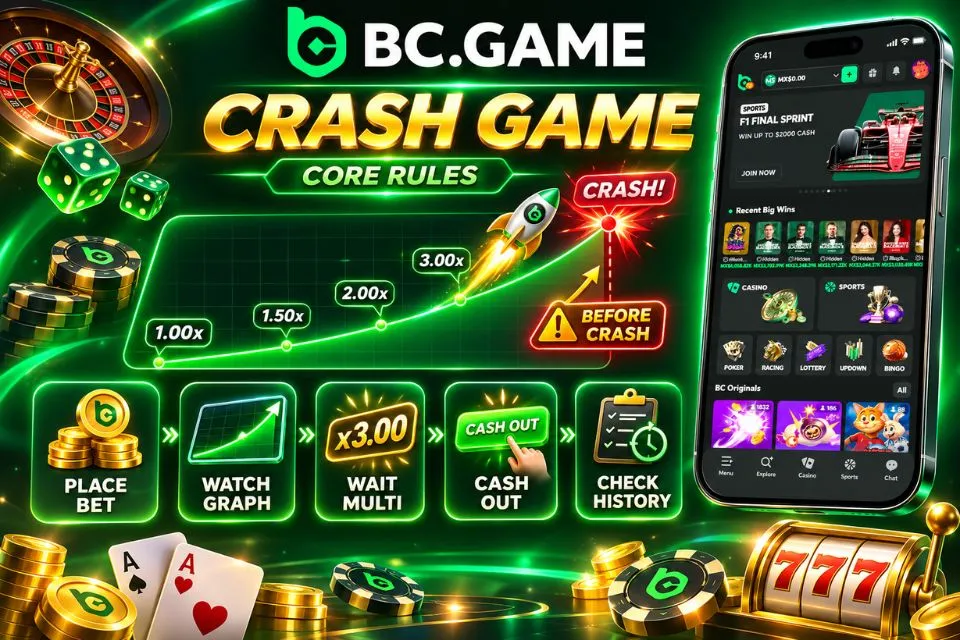
The round follows these essential rules:
- Place a valid wager before the betting window closes.
- Watch the multiplier start at 1.00x and rise along the graph.
- Select Cash Out while the round is active to settle the wager at the accepted multiplier.
- Lose the active stake if the crash occurs before the cashout is completed.
- Review the round result and settled amount in the game history.
For example, an MXN 50 wager settled at 1.50x returns MXN 75 in total, leaving MXN 25 above the original stake. If the graph crashes first, the MXN 50 is lost. The cashout must be accepted by the game, not merely clicked after the multiplier has ended.
Auto Cashout avoids dependence on a last-second click but cannot force a multiplier to rise. Other players’ cashouts do not alter the round outcome.
Multipliers Distribution and High 99% RTP Advantage
Crash results have no exploitable streak pattern. Low targets occur more often than large ones; reaching 10.00x is far less likely than reaching 2.00x.
In BC.Game Crash, the game is presented with an RTP of 99%, or equivalently, a house edge of 1%. RTP refers to the average payout from a huge number of bets of similar kind. It is not meant to suggest that 99 out of every 100 bets would be successful and that the player cannot lose more than 1%.
Under a simplistic model based on 99% RTP, the chances of achieving a 2.00x multiplier would be about 49.5%, compared to just 9.9% for a 10.00x. The history of prior rounds does not affect such probabilities.
Extremely high numbers, including those theoretically expected multiples up to 1,000,000x, are exceptionally rare and should not be considered as payouts. The actual stakes limit, the cap on win in the game, and any cap on cashout would limit how much the player could get paid. A rising multiplier is not a sure way of winning.

Create your profile now and audit the BC Game system.
Last used 3 minutes ago
Account Access: Complete BC.Game Crash Login and Setup Guide
The existing account provides access to Crash. A secure BC Game Crash login requires registered credentials and any applicable authentication checks.
Check account eligibility, balance currency and spending limits before playing.
Step-by-Step Instructions for BC.Game Crash Login
Users have the ability to utilize their registered email account credentials or even any other supported way to log in. While a mobile phone number could be used to verify the user, a dedicated phone-only option for logging in cannot be expected unless it’s made available.
Use the following account-access procedure:
- Click the button below to open the official BC.Game service available to your account.
- Select Sign In and choose the registered email or supported external login method.
- Enter the required credentials and confirm any email or account verification prompt.
- Complete the authenticator-code challenge if two-factor authentication is enabled.
- Open BC Originals, select Crash and check the wallet currency and game rules before betting.
If access fails, use account recovery. Never share authenticator codes or bypass identity checks. A pending MXN deposit cannot fund real-money stakes until credited.

Navigating Classic and Trenball Game Modes in BC.Game
Classic Crash and Trenball settle wagers differently. In Classic, the player chooses when to cash out on the rising curve. Trenball instead offers defined result conditions, with a winning selection settled according to the round’s final multiplier. Both formats share the underlying crash outcome, but a Trenball bet does not require manually pressing Cash Out after the round starts.
The principal choices are:
- Classic mode allows manual cashout or a predefined auto-cashout multiplier before the crash.
- Red in Trenball wins when the round finishes below 2.00x, with a 1.96x total payout under the standard rules.
- Green wins when the outcome reaches at least 2.00x and pays 2.00x under the standard rules.
- Moon wins when the multiplier reaches at least 10.00x and pays 10.00x under the standard rules.
Green and Moon overlap: an outcome of 12.00x satisfies both thresholds, although each wager settles separately at its own fixed multiplier. Some versions also include a specific Crash outcome for exactly 1.00x; confirm the available choices before betting. Red, Green and Moon are not three mutually exclusive portions of a wheel.
Trenball wagers must be confirmed before betting closes. Moon has a much lower success probability than Green despite its larger payout.
Provably Fair Verification in BC.Game Crash
Provably fair technology checks a completed result against precommitted cryptographic information. Individual rounds need not be recorded as blockchain transactions.
Cryptographic Seeds and Hash Transparency
The fairness mechanism separates the commitment made before play from the seed disclosed later. The server seed is generated by the game, while the client seed contributes another input. A nonce distinguishes individual calculations. A cryptographic hash makes the initial commitment checkable without revealing the hidden server seed before it is due for disclosure.

A meaningful check relies on four components:
- The server-seed hash commits the game to a hidden seed before the relevant round is settled.
- The client seed provides an additional input associated with the account or game session.
- The nonce identifies the particular calculation so that repeated bets do not reuse the same result input.
- The revealed server seed allows the original commitment and computed outcome to be checked afterward.
The matching hash verifies the commitment, not future outcomes or unrelated account operations.
How to Verify Any Round’s Outcome On-Chain
Verification is normally performed after the round has ended and the relevant server seed can be disclosed or rotated. A seed hash is not the same as a revealed server seed, and the correct nonce is essential for reproducing the result.
Follow the game-specific verification procedure:
- Open the completed Crash round in game history and record its round identifier.
- Copy the committed server-seed hash, client seed and nonce associated with that result.
- Reveal or rotate the relevant server seed when the fairness controls permit disclosure.
- Enter the revealed seed and other required values into the supported provably fair verifier.
- Compare the calculated crash multiplier with the recorded result and preserve the details if they differ.
Use the verifier assigned to the specific round. If the calculation still differs, save the round ID and contact support.
Create your profile now and audit the BC Game system.
Last used 3 minutes ago
Mobile Access: BC.Game Crash Download and App Installation
Crash can be opened on compatible mobile devices through the official Android application or Safari-based access on iOS. A BC Game Crash download refers to installing the platform’s mobile software, not a separate APK for the game. Account balances, accepted wagers and history remain linked to the registered profile.
Android Application Setup via BC.Game Crash Download (APK)
Obtain Android software through the official source. Modified APKs can compromise credentials; installation permissions are normally granted to the relevant browser or file manager.
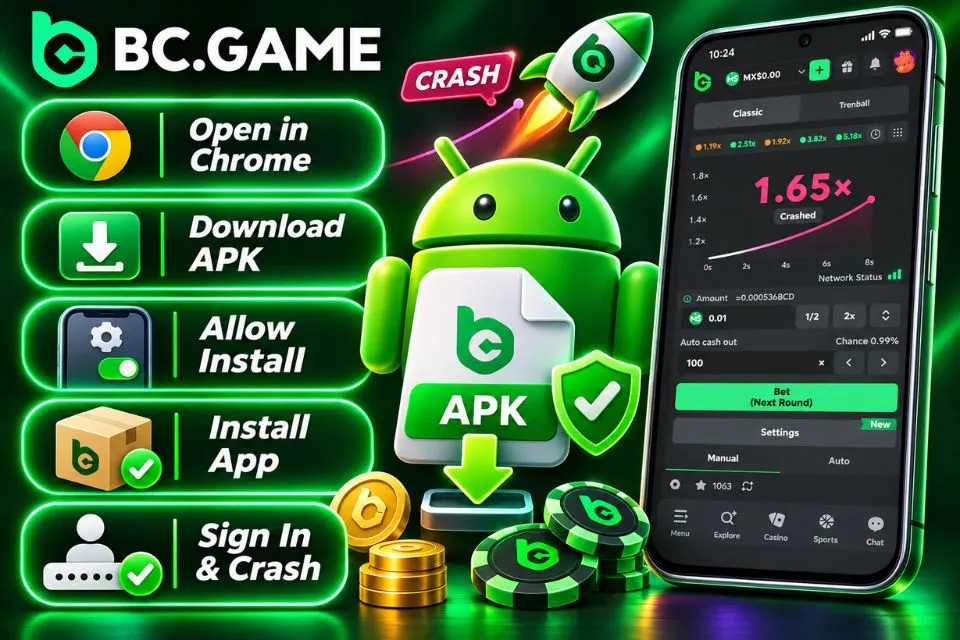
Complete the Android setup as follows:
- Click the button below in Chrome on the Android device to reach the official mobile application option.
- Select the supported Android download and save the APK package.
- Allow installation from the relevant source if the Android security prompt requires permission.
- Open the downloaded file and finish installation after reviewing the system confirmation.
- Launch the application, sign in and select Crash in BC Originals.
Disable temporary installation permission afterward. The browser and app use the same account. On mobile, manual cashout still requires a timely accepted request.
iOS Web App (PWA) Setup on iPhone Devices
An iPhone or iPad can use a Safari Progressive Web App (PWA) shortcut to open the mobile platform from the home screen. This is not an Android APK and does not make the original game available offline. Access to wallets and live rounds still requires connectivity.
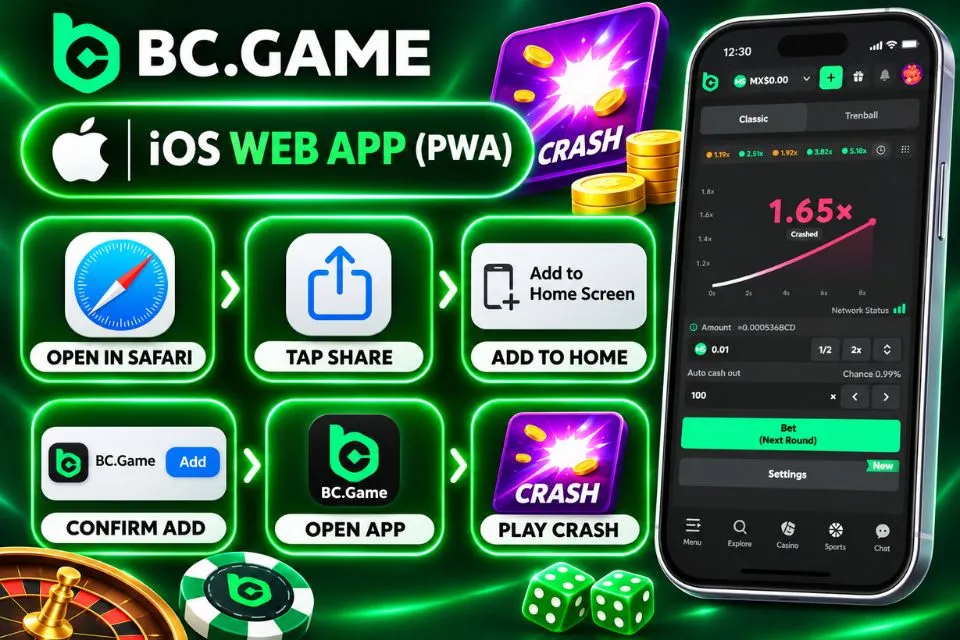
Create the shortcut using these steps:
- Open the official platform in Safari on a compatible iPhone or iPad.
- Tap Share in the Safari toolbar or page menu.
- Select Add to Home Screen from the available options.
- Confirm the app name and tap Add to create the home-screen icon.
Launch the new icon, sign in and open Crash as usual. Removing the shortcut does not delete account history or security requirements.
Mobile Performance Specifications and Mexican Payment Methods
A stable internet connection matters more to a time-sensitive crash round than high-end graphics hardware. Android performance depends on the current APK build, while Safari’s capabilities determine the iOS web-app experience. Neither method changes the probability of reaching a target multiplier.
The following specifications are practical guidance rather than unverified official minimum requirements.
| Parameter | Android APK | iOS PWA | Recommended Spec |
| Installation | Official Android package. | Safari home-screen shortcut. | Supported current version. |
| Operating system | Compatible with the distributed APK. | Compatible Safari and iOS web-app support. | Updated stable operating system. |
| Memory | Depends on device and app build. | Managed by iOS and Safari. | Around 4 GB RAM for multitasking. |
| Storage | Space for installer, application and cache. | Browser and web-app storage. | Leave room for updates. |
| Connectivity | Wi-Fi or mobile data. | Wi-Fi or mobile data. | Stable 4G, 5G or Wi-Fi. |
| Security | App permissions and account 2FA. | Device lock and account 2FA. | Strong credentials and current patches. |
Funding methods do not change Crash probabilities. MXN options depend on account eligibility.
| Payment Method | Currency | Min Deposit | Processing Time |
| SPEI, where available | MXN | Depends on the active cashier. | Bank and payment-provider dependent. |
| OXXO cash payment, where available | MXN | Depends on the issued payment reference. | After payment validation by the provider. |
| Visa or Mastercard, if enabled | MXN | Depends on issuer and cashier rules. | Card authorization and provider dependent. |
| USDT | USDT | 1 USDT as a reference minimum; confirm current network conditions. | Blockchain confirmation dependent. |
| Bitcoin | BTC | 0.0001 BTC as a reference minimum; confirm current network conditions. | Blockchain confirmation dependent. |
| Ethereum | ETH | 0.0003 ETH as a reference minimum; confirm current network conditions. | Blockchain confirmation dependent. |
Deposit minimums and game stakes are separate limits.
Local Deposits in Mexican Pesos (MXN) via SPEI, OXXO, and Crypto
Eligible Mexican accounts can use the payment options available in Wallet to fund gameplay. SPEI is an electronic interbank rail; OXXO can process qualifying cash payments with a generated reference. Crypto deposits require a network and asset that match the receiving address. A method used for deposits should not automatically be assumed available for withdrawals.
The principal funding methods work as follows:
- SPEI transfers send MXN from a compatible Mexican bank using the recipient details and payment reference.
- OXXO accepts an eligible cash deposit against a valid barcode or payment reference.
- Visa and Mastercard can fund an account when the issuer and payment provider permit the transaction.
- USDT requires the exact token network and deposit address selected for the transfer.
- BTC and ETH use their own wallet addresses, minimums and network confirmation requirements.
BBVA, Banorte or Santander can originate compatible SPEI payments. Keep the receipt or transaction hash until the deposit is credited.

Strategies and Auto Cashout Settings for BC.Game Crash
A cashout target changes the frequency and size of potential payouts, but it cannot improve the mathematical return of the game. Low targets such as 1.50x tend to be reached more often than 10.00x, while one crash before the target still loses the entire active wager. A bankroll plan should account for both the house edge and the speed of repeated rounds.
Create your profile now and audit the BC Game system.
Last used 3 minutes ago
Utilizing Auto Cashout and Advanced Betting Scripts
Auto Cashout settles an active Classic wager if the round reaches a chosen multiplier, such as 1.50x or 2.00x. It does not trigger a payment when the round crashes earlier. Automatic bet placement and advanced scripts are separate functions, available only when supported by the current game interface. Some versions have provided Simple, Martingale and Payout Martingale templates.
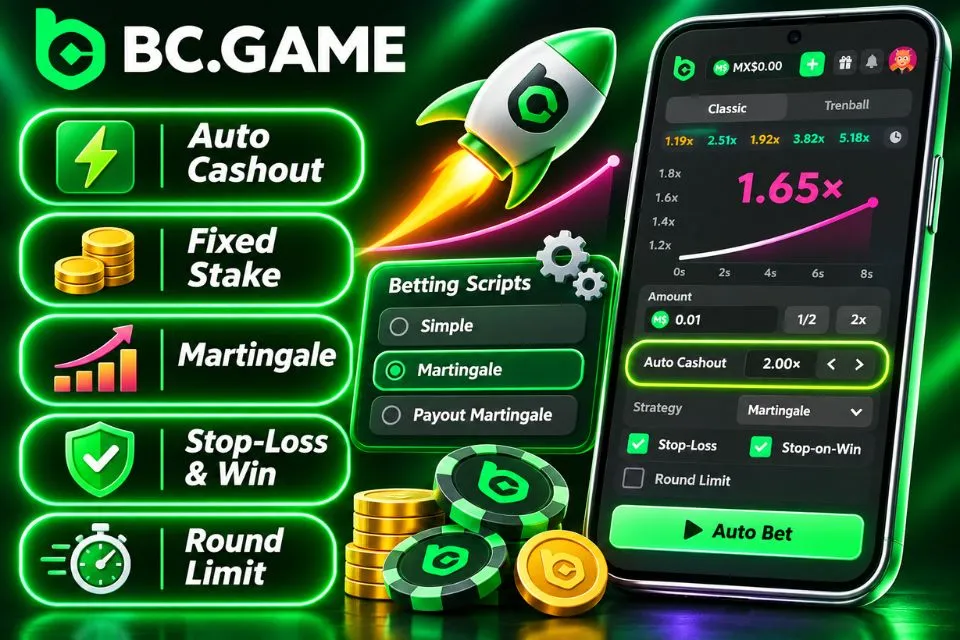
The relevant automation and bankroll controls are:
- Auto Cashout requests settlement at the selected multiplier when the round reaches it.
- Fixed-stake automation repeats a chosen amount without increasing the wager after a loss.
- Martingale progression increases stakes after losses and can exhaust a balance rapidly.
- Stop-loss and stop-on-win settings may end automated betting when a configured threshold is reached.
- A maximum round count or time limit keeps repeated bets within a predetermined session boundary.
Martingale does not overcome the 1% theoretical house edge. For illustration, a doubling sequence starting at MXN 10 can require stakes of MXN 10, MXN 20, MXN 40, MXN 80 and MXN 160 across five consecutive losing bets. Those wagers total MXN 310 at risk. Bet limits or available funds can interrupt the progression before a recovery occurs.
Similarly, selecting 1.50x does not make a win automatic. Under a simplified 99% RTP model, that target is reached roughly 66% of the time; the remaining outcomes lose the stake, which offsets the smaller winning returns over extensive play. A higher target shifts the distribution toward rarer, larger payouts without improving expected value.
Automation standardizes decisions rather than predicting results. Set MXN loss, time and round limits before using it; stop when any limit is reached.